A social media content calendar you can rearrange by dragging
See every draft, scheduled and published post in one calendar. Filter by network, spot AI-written posts at a glance, and drag a post to a new day to reschedule it.
Orbin’s content calendar shows every draft, scheduled and published post in a month, week or day view. Filter by network, spot AI-generated posts at a glance, and drag a post to a new day to reschedule it. Posts can also repeat daily, weekly or monthly.
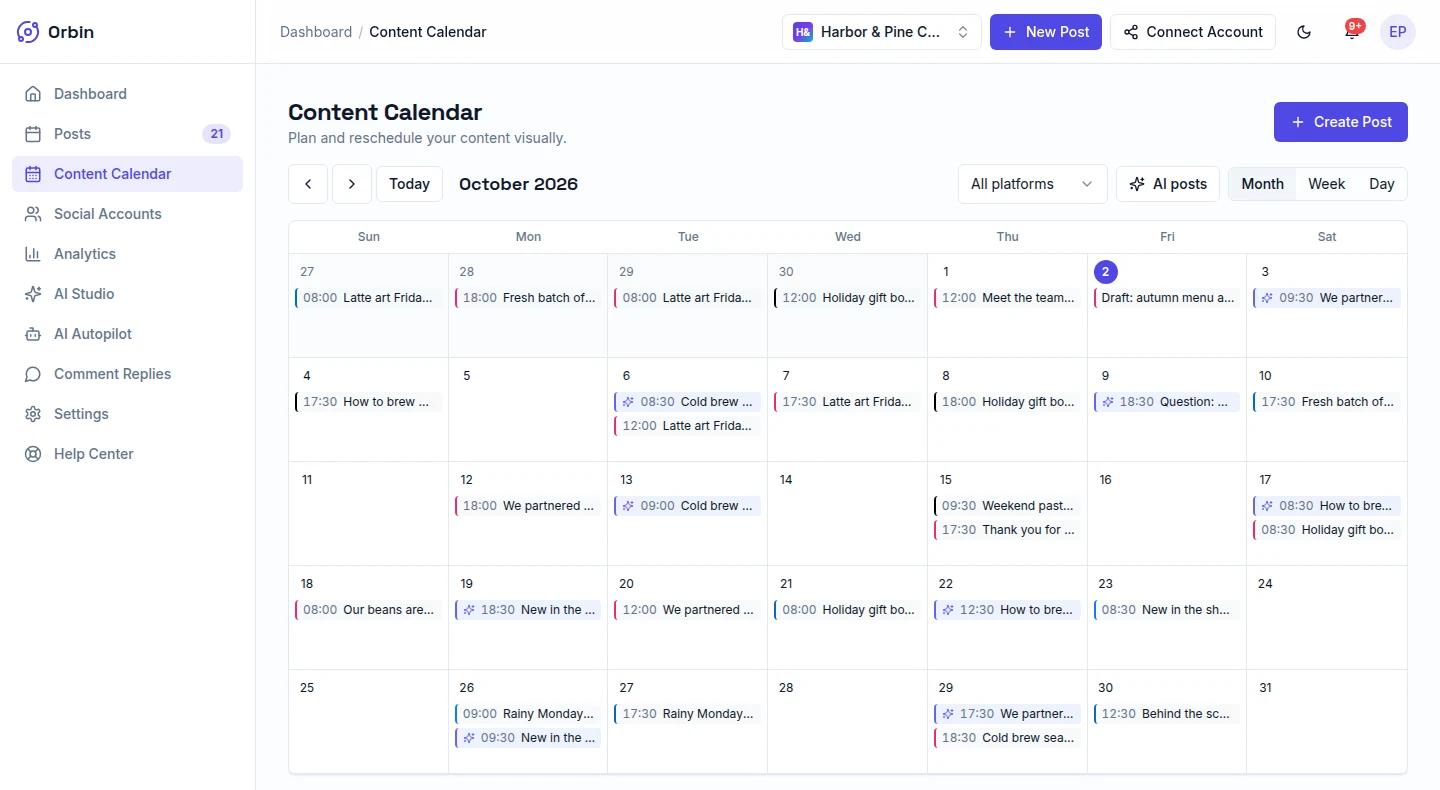
Screenshots show sample data from a fictional workspace.
How the content calendar works
Schedule a post
Write a post, choose the connected accounts, then pick a date and time or a quick preset such as Tomorrow 9:00 AM, Next Monday 10:00 AM or This evening 6:00 PM.
Open the calendar
Your post appears on the Content Calendar. Switch between Month, Week and Day views to zoom in or out.
Filter what you see
Narrow the calendar to one network, or switch on AI posts to show only the posts Autopilot wrote.
Drag to reschedule
Drag a post to another day in the Month or Week view. It keeps its time of day. Click any post to edit it.
What Content Calendar includes
Month, week and day views
The month grid shows the shape of your whole schedule, the week view gives each day more room, and the day view lists the day’s posts with their networks and status.
Filter by network
Show every post, or only the ones going to a single network, so a busy schedule stays readable.
AI posts at a glance
Posts written by AI Autopilot carry a sparkle marker, and the AI posts filter shows only those, so you can review what the AI has queued.
Repeating posts
Set a post to repeat daily, weekly or monthly, with an optional end date, for evergreen content you want to run on a rhythm.
Safe to rearrange
- Only unpublished posts move. Drafts, scheduled posts and failed posts can be dragged to a new day. Posts that are publishing or already published stay where they are.
- No accidental past dates. Dropping a post onto a time that has already passed does nothing, so a slip of the mouse cannot schedule something in the past.
- Clear time zones. The scheduler shows the time zone it is using, which is your browser’s, so you can check it before you commit.
- Cancel without losing the post. Cancelling a schedule moves the post back to your drafts rather than deleting it.
Good to know
- The Day view is a read-only agenda. To reschedule by dragging, use the Month or Week view.
- A month cell shows the first three posts for a day, then a “more” count. Switch to the Week or Day view to see them all.
- The quick time suggestions in the scheduler (Morning, Lunch, Evening, Night) are general posting windows, not personalised to your account. For your own best times, use the heatmap in Analytics.
- Monthly scheduling limits depend on your plan; the table above shows them.
Content Calendar by plan
| Plan | Content Calendar |
|---|---|
| Starter | 30 / mo |
| Professional | Unlimited |
| Business | Unlimited |
| Enterprise | Unlimited |
Every plan starts with a 14-day free trial. Compare all plans →
Frequently asked questions
Does Orbin have a social media content calendar?+
Yes. The Content Calendar shows your drafts, scheduled posts and published posts in a month, week or day view, and works with every network Orbin publishes to.
Can I drag and drop posts to reschedule them?+
Yes, in the Month and Week views. Drag a draft, scheduled or failed post to another day and it keeps its time of day. Published posts cannot be moved.
Can I schedule a post to repeat?+
Yes. Turn on “Repeat this post” in the scheduler and choose daily, weekly or monthly, with an optional end date.
Can I see only the posts the AI wrote?+
Yes. The AI posts filter on the calendar shows only posts generated by AI Autopilot, each marked with a sparkle.
Which networks can I schedule posts to?+
Orbin publishes to Facebook, Instagram, X, and LinkedIn. Pinterest, TikTok, YouTube, and Threads are coming soon.
Want the full walkthrough? Read the step-by-step guide →
Explore more of Orbin
AI Autopilot
Orbin AI Autopilot scans your website, then drafts and schedules on-brand social posts every week across your networks, with review before anything publishes.
Learn moreSocial Media Analytics
Track reach, engagement rate and follower growth across your networks, find the days and hours your posts do best, and export a CSV report.
Learn moreTeam Collaboration
Invite teammates to a shared Orbin workspace with Owner, Admin, Member and Viewer roles, so a team can plan, review and publish social content together.
Learn moreTry Content Calendar free for 14 days
A card is required to start, and you won't be charged until the trial ends. Cancel anytime before then.
Start free trial