One shared workspace for your whole social media team
Invite teammates with Owner, Admin, Member and Viewer roles. Everyone works from the same accounts, drafts and calendar, with admin controls kept to the people who need them.
Orbin workspaces let a team manage social media together. Invite teammates as Admin, Member or Viewer while the Owner keeps overall control. Roles decide who can connect accounts, manage billing and change settings, and the number of team members you can invite depends on your plan.
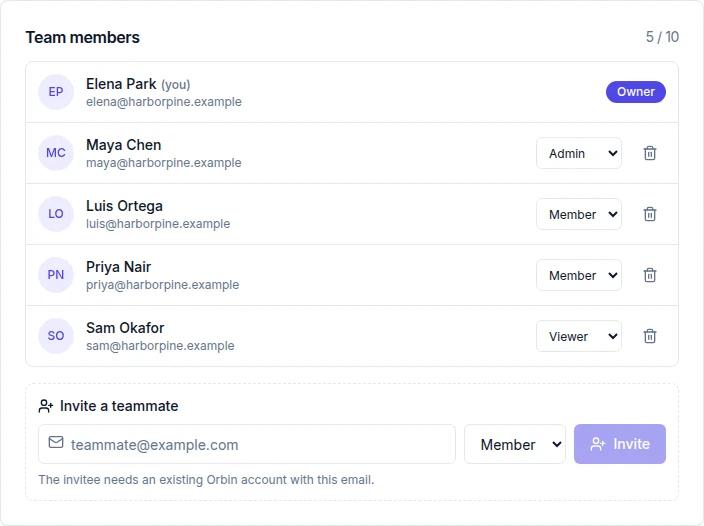
Screenshots show sample data from a fictional workspace.
How team workspaces work
Teammates create an Orbin account
The person you want to invite signs up for Orbin first, because invitations are matched to existing accounts by email address.
Invite them to your workspace
In Settings → Workspace, an Admin or Owner enters their email and picks a role: Admin, Member or Viewer. They receive an invitation email.
Work from the same space
Everyone sees the workspace’s connected accounts, drafts, scheduled posts and calendar, so work is not scattered across logins.
Change roles as the team changes
Admins and Owners can change a member’s role or remove them at any time.
What Team Collaboration includes
Four roles
Owner, Admin, Member and Viewer give you a clear ladder of access, from full control of the workspace down to the lightest membership.
Admin controls
Admins can connect and disconnect social accounts, manage billing, invite and remove teammates, change roles, and configure AI Autopilot and comment-reply settings.
Members do the day-to-day
Members can review and approve AI comment replies and regenerate Autopilot drafts, so routine review does not need an admin.
Workspace-level brand setup
Brand details and brand voice live on the workspace, so every teammate’s AI drafts start from the same description of your business.
Control stays with the Owner
- Only an Owner manages Owners. Only an Owner can grant the Owner role, change another Owner’s role, remove an Owner, or delete the workspace.
- The last Owner is protected. A workspace always keeps at least one Owner. The last Owner cannot be demoted or removed, so a workspace is never left without someone in charge.
- A plan-based seat limit. Invitations stop at the member limit for your plan, so the team cannot grow past what you are paying for by accident.
Good to know
- The person you invite needs an existing Orbin account; inviting an email address with no account is not supported yet.
- Invitations are for Admin, Member or Viewer. Ownership is only ever granted by an existing Owner.
- Human review in Orbin today covers AI Autopilot drafts, AI comment replies and AI video. A separate multi-step approval chain for every post is not part of this feature.
- The member limit for each plan is in the table above.
Team Collaboration by plan
| Plan | Team Collaboration |
|---|---|
| Starter | 1 |
| Professional | 3 |
| Business | 10 |
| Enterprise | Unlimited |
Every plan starts with a 14-day free trial. Compare all plans →
Frequently asked questions
Can multiple people manage the same social accounts in Orbin?+
Yes. Invite teammates to your workspace and they work from the same connected accounts, drafts and calendar. How many people you can invite depends on your plan.
What roles does Orbin have?+
Owner, Admin, Member and Viewer. Owners and Admins manage the workspace, accounts, billing and team. Members handle day-to-day review work such as approving comment replies.
Can I invite someone who does not have an Orbin account?+
Not yet. The person needs to create an Orbin account first, and then you invite them by the email address they signed up with.
Who can delete the workspace?+
Only an Owner. The last Owner of a workspace cannot be demoted or removed.
How many team members does each plan include?+
The limit grows with each plan and is unlimited on Enterprise. See the plan table on this page or the pricing page for the exact numbers.
Explore more of Orbin
Content Calendar
Plan every post on a month, week or day calendar. Filter by network, drag to reschedule, and see drafts, scheduled and published posts in one place.
Learn moreAI Autopilot
Orbin AI Autopilot scans your website, then drafts and schedules on-brand social posts every week across your networks, with review before anything publishes.
Learn moreAI Comment Replies
Orbin drafts on-brand replies to comments on your Facebook and Instagram posts. Approve each one, or let Orbin post automatically on Business and above.
Learn moreTry Team Collaboration free for 14 days
A card is required to start, and you won't be charged until the trial ends. Cancel anytime before then.
Start free trial